Design - COM Layer
August 16, 2026
Last updated on August 17, 2026
OneMore never talks to OneNote directly. Every call into the OneNote object model goes through a small COM layer — ApplicationFactory and OneNote — that owns activation, retry, and cleanup of the underlying Microsoft.Office.Interop.OneNote.IApplication COM object.
This layer exists because of where OneMore runs. As described in TechNote - COM Surrogate, the add-in is hosted inside a dllhost.exe COM surrogate process, separate from ONENOTE.EXE, and that surrogate runs in an MTA apartment. Two consequences follow directly from that hosting model:
- Cross-process, cross-apartment calls into OneNote are more prone to transient failure (the app is busy, an RPC channel drops) than an in-proc call would be, so every call needs a recovery story, not just a try/catch.
- .NET's ordinary GC-driven finalization of COM proxies (RCWs) is not trustworthy timing under this hosting model — a proxy released "whenever the finalizer gets around to it" can stall OneNote. Proxies have to be released explicitly, immediately after use.
The result is a design that favors short-lived, defensively-managed COM objects over a single long-lived cached proxy protected by a lock.
Architecture
Three pieces cooperate:
- ApplicationFactory (OneMore/Helpers/ApplicationFactory.cs) — the only place that actually activates the COM object: new Application(). Wraps activation in its own retry loop. Also doubles as a "poor-man's IOC" so tests can register a mock IApplication instead.
- OneNote (OneMore/OneNote.cs) — the wrapper commands actually use. Holds one IApplication onenote field, adds retry/recovery around calls, converts raw XML into typed models, and implements IDisposable / IAsyncDisposable to guarantee the COM proxy is released.
- Commands — never hold a cached OneNote/IApplication reference. Each command creates its own short-lived OneNote instance for the duration of Execute():
await using (one = new OneNote())
{
var section = await one.GetSection();
var ns = one.GetNamespace(section);
...
}
|
Command PlantUML (Extract) |
|
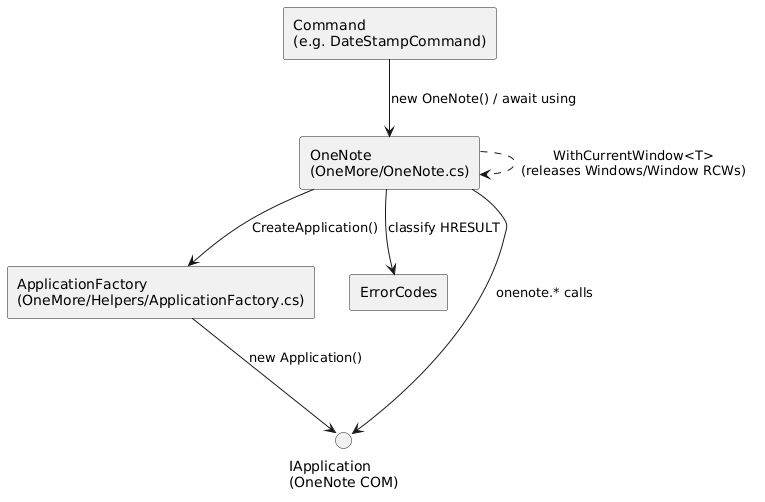
Every activation is independent — there is no shared singleton in production. ApplicationFactory's singleton/type fields exist solely so OneMoreTests can inject MockApplication for unit tests; the real code path always calls new Application().
Retry & recovery mechanics
Two retry loops exist, at two different layers:
|
Layer |
Method |
Retries |
Backoff |
Guards |
|
Activation |
|
3 |
250ms × retryCount |
hrCOMBusy, hrRpcSysCallFailed, hrRpcFailed, hrRpcFailed2, hrRpcUnavailable |
|
Per-call |
|
3 |
250ms × retryCount (+250ms extra for RPC errors) |
InvalidComObjectException, COMException (see table below) |
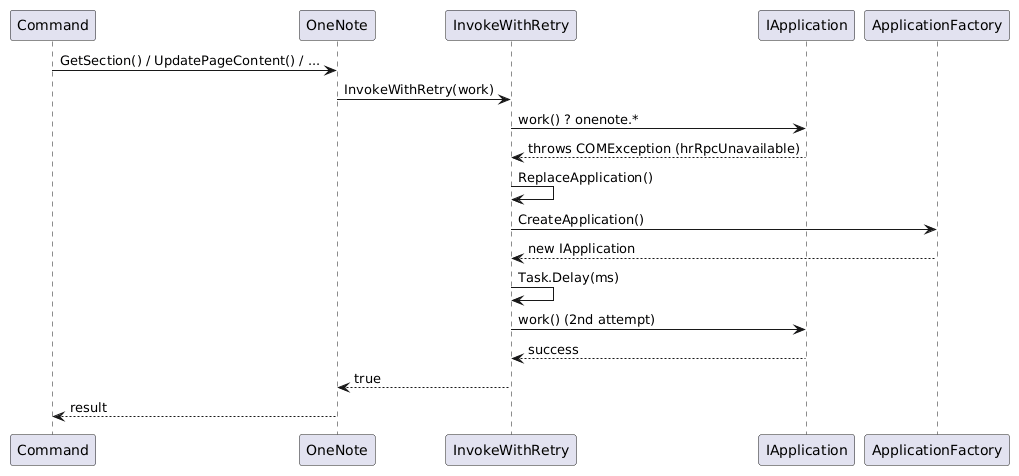
InvokeWithRetry (OneMore/OneNote.cs:349-431) is the workhorse — it wraps ~17 call sites in OneNote.cs. On failure it decides whether the error is worth retrying at all:
|
HRESULT |
Meaning |
Behavior |
|
|
The XML is invalid |
Abort immediately, no retry |
|
|
RPC call failed |
Abort immediately — known OneNote API defect (a paragraph linked to another paragraph containing an equation) |
|
|
RPC channel down |
Retry, with an extra 250ms added to let a new RPC connection bind |
|
|
Application busy / object gone |
Retry with standard backoff |
|
|
The RCW's underlying COM object was already released |
Retry with standard backoff |
Any retry — regardless of which branch triggered it — first calls ReplaceApplication() (OneMore/OneNote.cs:434-450), which releases the current proxy and re-activates a fresh one via ApplicationFactory before the action is attempted again:
private void ReplaceApplication()
{
if (onenote is not null)
{
try
{
if (Marshal.IsComObject(onenote))
Marshal.FinalReleaseComObject(onenote);
}
catch (Exception exc) { logger.WriteLine("error releasing onenote in retry", exc); }
}
onenote = ApplicationFactory.CreateApplication();
}
FinalReleaseComObject (not the ordinary ReleaseComObject) is used here deliberately — the old proxy may already be in a bad state, which is why we're recovering, so its reference count is forced to zero in one call rather than decremented normally.
|
Retry Signaling Flow PlantUML (Extract) |
RCW lifecycle management
Beyond the retry path, the wrapper is careful about every COM proxy it touches, not just the top-level IApplication. WithCurrentWindow<T> (OneMore/OneNote.cs:299-340) backs several properties (CurrentPageId, WindowHandle, OwnerWindow, ...) and explicitly releases the intermediate Windows collection and Window proxies as soon as it's done with them, rather than leaving that to garbage collection:
private T WithCurrentWindow<T>(Func<Window, T> reader, T fallback)
{
if (onenote is null) return fallback;
Windows windows;
try { windows = onenote.Windows; }
catch (COMException exc)
{
logger.WriteLine($"cannot read Windows collection ({exc.ErrorCode:X})", exc);
return fallback;
}
try
{
var window = windows.CurrentWindow;
try { return window is null ? fallback : reader(window); }
catch (COMException exc)
{
logger.WriteLine($"cannot read Window property ({exc.ErrorCode:X})", exc);
return fallback;
}
finally
{
if (window is not null && Marshal.IsComObject(window))
Marshal.ReleaseComObject(window);
}
}
finally
{
if (Marshal.IsComObject(windows))
Marshal.ReleaseComObject(windows);
}
}
OneNote.Dispose follows the same principle for the top-level proxy, and carries a pointed comment about the one thing not to do:
public void Dispose()
{
Dispose(disposing: true);
// DO NOT call this otherwise OneNote will not shutdown properly
//GC.SuppressFinalize(this);
}
Suppressing the finalizer here would remove the safety net that eventually releases the RCW if Dispose was somehow skipped — under the MTA hosting model, that safety net matters more than the minor GC cost of keeping it.
Concurrency model
There is deliberately no lock, semaphore, or mutex guarding IApplication access anywhere in OneNote.cs or ApplicationFactory.cs. Instead of serializing concurrent commands onto one shared proxy, the design gives each command its own short-lived IApplication activation and treats failures — including failures caused by two commands colliding on the OneNote app at once — as an expected, retryable condition.
This is a different concern from SingleThreaded (OneMore/Helpers/SingleThreaded.cs), which marshals STA-bound UI work (clipboard access, OpenFileDialog) onto a throwaway STA thread. OneNote COM calls are not routed through SingleThreaded — they run wherever the command runs, relying on InvokeWithRetry/ReplaceApplication for resilience rather than thread affinity.
Recent hardening: issue #2455
Commit 05ef7edf ("harden concurrent COM layer", #2464, relates to #2455) is a concrete example of this pattern evolving under real-world failures:
- ApplicationFactory.CreateApplication() — the retry filter only caught hrCOMBusy. It was widened to also retry on hrRpcSysCallFailed, hrRpcFailed, hrRpcFailed2, and hrRpcUnavailable, matching the set already handled by InvokeWithRetry — activation itself can hit the same RPC failures as any other call.
- ErrorCodes — added hrRpcSysCallFailed = 0x80010100 and its description ("RPC system call failed").
- WithCurrentWindow<T> — previously called onenote.Windows with no guard at all. Hardened to null-check onenote up front and wrap the Windows access in a try/catch, logging and returning the caller's fallback on COMException instead of letting the exception propagate.
The theme across all three changes: treat COM failure as routine at every boundary the wrapper crosses, not just the ones already known to be flaky.
References
- OneMore/OneNote.cs — wrapper class, InvokeWithRetry, ReplaceApplication, WithCurrentWindow<T>, Dispose
- OneMore/Helpers/ApplicationFactory.cs — COM activation + activation-time retry
- OneMore/Helpers/ErrorCodes.cs — HRESULT constants and descriptions
- OneMore/Helpers/SingleThreaded.cs — STA marshaling for UI-only work (contrast)
- TechNote - COM Surrogate
- TechNote - Interop
- Design - Command Framework
───────────────────────────────────────────────────────────────────────────────────────────────────
Command PlantUML (Refresh)
@startuml
skinparam componentStyle rectangle
component "Command\n(e.g. DateStampCommand)" as Command
component "OneNote\n(OneMore/OneNote.cs)" as OneNote
component "ApplicationFactory\n(OneMore/Helpers/ApplicationFactory.cs)" as Factory
component "ErrorCodes" as Errors
interface "IApplication\n(OneNote COM)" as IApp
Command --> OneNote : new OneNote() / await using
OneNote --> Factory : CreateApplication()
Factory --> IApp : new Application()
OneNote --> IApp : onenote.* calls
OneNote --> Errors : classify HRESULT
OneNote ..> OneNote : WithCurrentWindow<T>\n(releases Windows/Window RCWs)
@enduml
Retry Signaling Flow PlantUML (Refresh)
@startuml
participant Command
participant "OneNote" as One
participant "InvokeWithRetry" as Retry
participant "IApplication" as IApp
participant "ApplicationFactory" as Factory
Command -> One : GetSection() / UpdatePageContent() / ...
One -> Retry : InvokeWithRetry(work)
Retry -> IApp : work() → onenote.*
IApp --> Retry : throws COMException (hrRpcUnavailable)
Retry -> Retry : ReplaceApplication()
Retry -> Factory : CreateApplication()
Factory --> Retry : new IApplication
Retry -> Retry : Task.Delay(ms)
Retry -> IApp : work() (2nd attempt)
IApp --> Retry : success
Retry --> One : true
One --> Command : result
@enduml
#omwiki #omdeveloper #omdesign
© 2020 Steven M Cohn. All rights reserved.
Please consider a sponsorship or one-time donation to support ongoing development
Created with OneNote.